
Automatically detects spikes in data and copies only observations to the output that are not considered as spikes. This simple spike filter is based on two configuration values the Maximum value fluctuation and the Maximum observation count in spike. This spike filter is meant to be used for series of data that may include bursts of erroneous data.
Figure 1, 2 and 3 show examples of the application of this spike filter to a series of values.
Characteristic |
Description |
Supports incremental execution |
No |
Output typing |
Implicit |
Locking of source features |
Observation modification, observation deletion |
Copy |
Table 1: Calculation brief
No |
Name |
Type, Constraint |
Multiplicity (Min,Max) |
1 |
Feature to process |
Features or calculations, at least one numeric or quantity property. |
1,1 |
Table 2: Input pins
Configuration |
Type |
Notes |
Default value |
Include erroneous |
Boolean |
If set to true, erroneous observations of the source feature or calculation will be processed. |
False |
Property to calculate |
Property |
The property that is used for the spike filtering. |
|
Maximum value fluctuation |
Numeric |
Changes beyond this value mean spike, if value returns inside this range after distance specified by the next parameter |
|
Maximum observation count in spike |
Numeric |
Number of observations to look for the value to return to its normal range after spike-like change was detected by the previous setting |
1 |
Table 3: Configuration settings
If the calculation is the final calculation of the algorithm the used classifications of the source features or calculations has to be the used classification in the domain of the calculated feature.
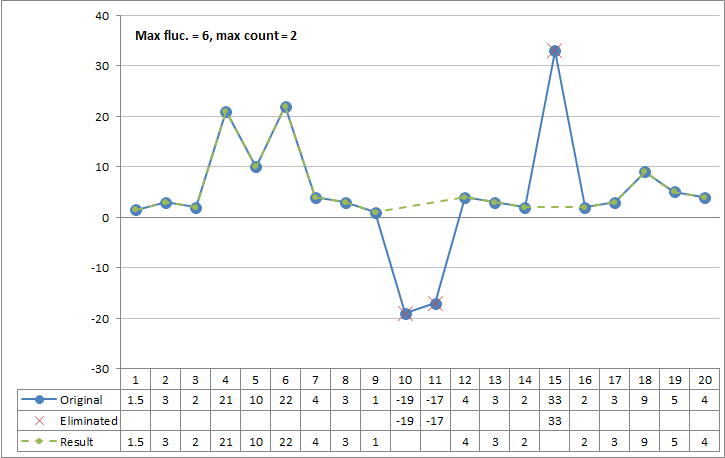
Figure 1: Spike filter example 1
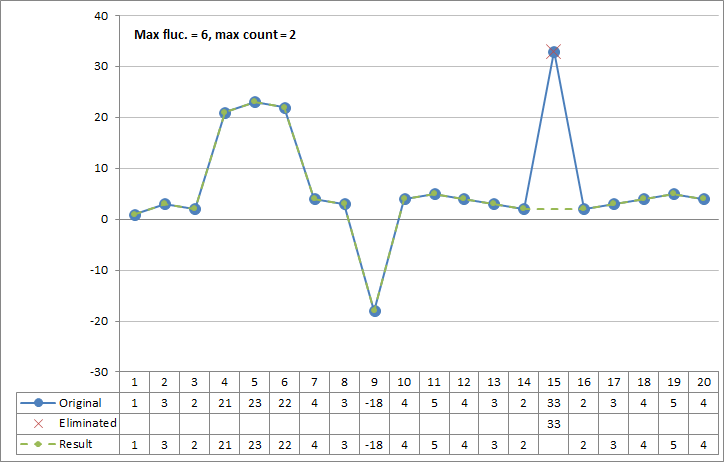
Figure 2: Spike filter example 2
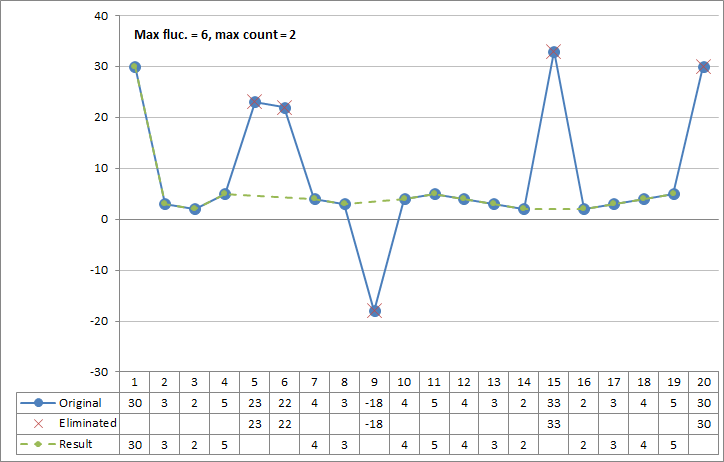
Figure 3: Spike filter example 3